Important: These forums are for discussions between SkyDemon users. They are not routinely monitored by SkyDemon staff so any urgent issues should be sent directly to our Customer Support.

Upload Flight plan & Traffic to Aera 660


Author
Message
constantin_w
c
Too Much Forum (315 reputation)Too Much Forum (315 reputation)Too Much Forum (315 reputation)Too Much Forum (315 reputation)Too Much Forum (315 reputation)Too Much Forum (315 reputation)Too Much Forum (315 reputation)Too Much Forum (315 reputation)Too Much Forum (315 reputation)
Group: Forum Members
Posts: 17, Visits: 16
Hi guys,

I read through the old posts from 2019. I am currently using a Garmin 495 in my RV12 to guide the autopilot which sucks... The airplane isn't the most expensive plane and we are therefore a bit cost sensitive when it comes to upgrades (some day that may change...). Anyways, we are therefore looking into replacing the 495 with the Aera 660 (760 doesn't fit in the center console). Generally, the system allows for inflight adjustment of the route and autopilot GPS navigation (in contrast to the current system...). However, I am wondering if there is a chance to connect Skydemon to the Aera 660 to upload flight plans (either bluetooth or wifi). It seems to be possible with foreflight. Does an additional hardware piece potentially do the job?

Additionally, I am using Stratux linked to Skydemon which works fine most of the time. I would love to pass the traffic information on to the Aera 660. Or even better, the weather. Any idea how this could be realized?

BR
Constantin

WiltshireMike
W
Too Much Forum (89 reputation)Too Much Forum (89 reputation)Too Much Forum (89 reputation)Too Much Forum (89 reputation)Too Much Forum (89 reputation)Too Much Forum (89 reputation)Too Much Forum (89 reputation)Too Much Forum (89 reputation)Too Much Forum (89 reputation)
Group: Forum Members
Posts: 7, Visits: 22
Me too!

I'm swapping a GPS296 for an Aera660 and it would be great if SD could send the route direct via Bluetooth from my Nexus7 to the 660 without paying ~£80 for a basic GarminPilot subscription to export from SD to GP then via Connext to the 660 (Nexus is using its WiFi connection to talk to SkyEcho).

Even greater if an in-flight change to SD route could be auto-synchronised to the 660 using its automatic  incoming flight plan option. 

Tim, has anything moved on since 2019?

Tim Dawson
Tim Dawson
SkyDemon Team (705K reputation)SkyDemon Team (705K reputation)SkyDemon Team (705K reputation)SkyDemon Team (705K reputation)SkyDemon Team (705K reputation)SkyDemon Team (705K reputation)SkyDemon Team (705K reputation)SkyDemon Team (705K reputation)SkyDemon Team (705K reputation)
Group: Forum Members
Posts: 8.3K, Visits: 10K
Garmin are still unwilling to allow us to transfer such information directly to their products.
wacits
wacits
Too Much Forum (813 reputation)Too Much Forum (813 reputation)Too Much Forum (813 reputation)Too Much Forum (813 reputation)Too Much Forum (813 reputation)Too Much Forum (813 reputation)Too Much Forum (813 reputation)Too Much Forum (813 reputation)Too Much Forum (813 reputation)
Group: Forum Members
Posts: 11, Visits: 43
Tim Dawson - 1/24/2022 11:39:12 AM
Garmin are still unwilling to allow us to transfer such information directly to their products.

Tom

Any change from Garmin?
I note that foreflight has been able to transfer routes both ways using the connext for some time.

Thanks for creating the share route to direct to Garmin pilot. This works a treat and I can then send route to the Aera 660 from Garmin pilot at a button push. However that's another £100 annual subscription for Garmin Pilot. ( I did it for a year to test, but decided it was not worth having 2 nav system. I am keeping to SD)

ta

Tim Dawson
Tim Dawson
SkyDemon Team (705K reputation)SkyDemon Team (705K reputation)SkyDemon Team (705K reputation)SkyDemon Team (705K reputation)SkyDemon Team (705K reputation)SkyDemon Team (705K reputation)SkyDemon Team (705K reputation)SkyDemon Team (705K reputation)SkyDemon Team (705K reputation)
Group: Forum Members
Posts: 8.3K, Visits: 10K
The situation is identical to before - Garmin are unwilling to allow this connectivity to any vendor other than Foreflight.
wacits
wacits
Too Much Forum (813 reputation)Too Much Forum (813 reputation)Too Much Forum (813 reputation)Too Much Forum (813 reputation)Too Much Forum (813 reputation)Too Much Forum (813 reputation)Too Much Forum (813 reputation)Too Much Forum (813 reputation)Too Much Forum (813 reputation)
Group: Forum Members
Posts: 11, Visits: 43
Thanks for the update Tim
Luis Fernández
Luis Fernández
Junior Member (18 reputation)Junior Member (18 reputation)Junior Member (18 reputation)Junior Member (18 reputation)Junior Member (18 reputation)Junior Member (18 reputation)Junior Member (18 reputation)Junior Member (18 reputation)Junior Member (18 reputation)
Group: Forum Members
Posts: 4, Visits: 137
wacits - 1/18/2024 2:01:20 PM
Thanks for the update Tim

How I Transfer a Route from SkyDemon to the Garmin AERA 760:
Some people may already know this, but here’s the method I use to transfer a SkyDemon route directly into my AERA 760.

1) Connecting the iPad to the AERA 760
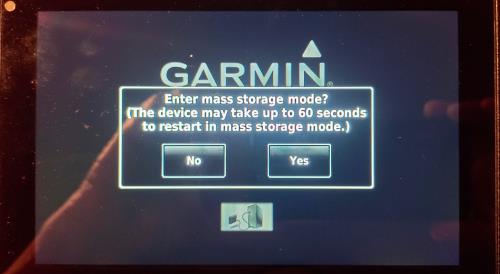
I connect my iPad to the AERA 760 using a USB‑C ↔ USB‑C cable.
The AERA automatically switches into Mass Storage Mode.

2) Saving the Route from SkyDemon
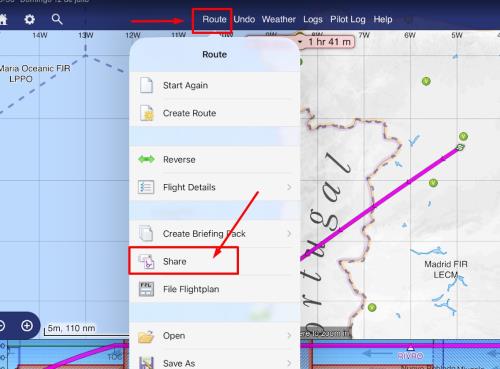
In SkyDemon I do:

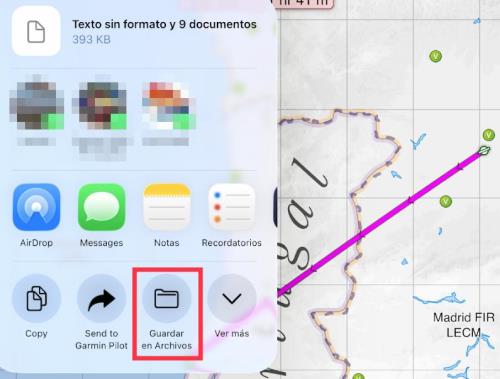
Route → Share → Save to Files


A new “disk” appears, usually named 010C109800 (the AERA’s storage).
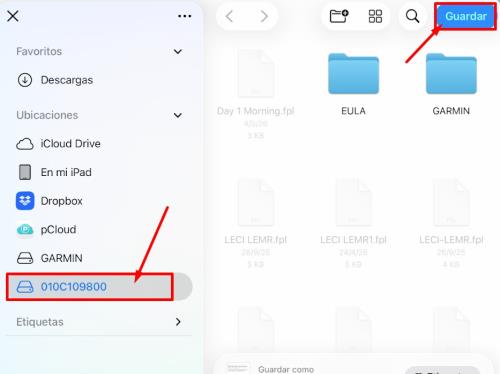


I select that disk and tap Save.

3) Loading the Route on the AERA 760
Once on the AERA, there are two ways to bring the flight plan into the device:

a) Flight Plan List 
I go to Flight Plan List, where a flight plan with a strange name appears.
You can rename it.
In this mode, the waypoints do not have names.

b) Import Flight Plan (my preferred method)
I go to Flight Plan List and use the Import function.
In this case, the waypoints do have names.

Regards.
Edited 3 hours ago by Luis Fernández
GO

Merge Selected

Merge into selected topic...


Merge into merge target...


Merge into a specific topic ID...


Reading This Topic

Login

Explore
Messages
Mentions
Search