|
Group: Forum Members
Posts: 6,
Visits: 2
|
Android: 4.2.2 SD : 3.6.3.28529 Hi, New user here, so may well have missed something obvious. I can create routes and save them to cloud on the PC and then open them on the tablet. No problem. But I am unable to save them locally on the tablet. I can open the Save As dialogue and give it a name, but the instructions then say to click Done. But I don't have a 'Done'. No sign of it - and anything I do click closes the dialogue without saving the route. (Clicking the Return button, bottom right, doesn't do anything.) Any help much appreciated. 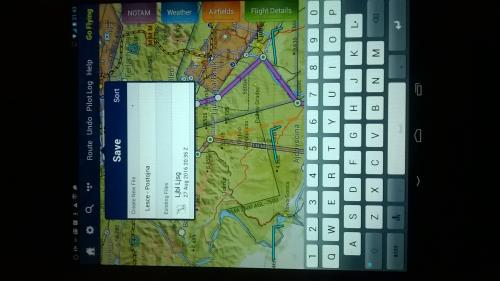
|
|
Group: Forum Members
Posts: 627,
Visits: 15K
|
+x+x+xAndroid: 4.2.2 SD : 3.6.3.28529 Hi, New user here, so may well have missed something obvious. I can create routes and save them to cloud on the PC and then open them on the tablet. No problem. But I am unable to save them locally on the tablet. I can open the Save As dialogue and give it a name, but the instructions then say to click Done. But I don't have a 'Done'. No sign of it - and anything I do click closes the dialogue without saving the route. (Clicking the Return button, bottom right, doesn't do anything.) Any help much appreciated. In the Save As dialogue box, having entered a name for your route file, hit return on your keyboard, and the Save As dialogue box disappears. If you then tap on Route > Open and you should see your route listed. To reload it, just tap it. Hi Mike, Thanks for the reply. This doesn't work for me. Hitting return just zooms the map in and the SaveAs dialogue box stays on the screen. Taping elsewhere on the map does make it disappear, but no route is then saved. Ralph Hi Ralph In that case, I would try uninstalling SD and then reinstall and see if that sorts things out. Which particular make of tablet are you using? Do you have another Android device, such as a phone, that you try it out on?
Mike _________________________________________ Samsung Galaxy Tab A8 – Android 11.0 & SD 4.2.2 Huawei P30 – Android 11.0 & SD 4.2.2
PC – Windows 10 (Home Ed) Version 22H2, Build 19045.6575, SD 4.2.2
|
|
Group: Forum Members
Posts: 113,
Visits: 1.6K
|
+x+x+x+xAndroid: 4.2.2 SD : 3.6.3.28529 Hi, New user here, so may well have missed something obvious. I can create routes and save them to cloud on the PC and then open them on the tablet. No problem. But I am unable to save them locally on the tablet. I can open the Save As dialogue and give it a name, but the instructions then say to click Done. But I don't have a 'Done'. No sign of it - and anything I do click closes the dialogue without saving the route. (Clicking the Return button, bottom right, doesn't do anything.) Any help much appreciated. In the Save As dialogue box, having entered a name for your route file, hit return on your keyboard, and the Save As dialogue box disappears. If you then tap on Route > Open and you should see your route listed. To reload it, just tap it. Hi Mike, Thanks for the reply. This doesn't work for me. Hitting return just zooms the map in and the SaveAs dialogue box stays on the screen. Taping elsewhere on the map does make it disappear, but no route is then saved. Ralph Hi Ralph In that case, I would try uninstalling SD and then reinstall and see if that sorts things out. Which particular make of tablet are you using? Do you have another Android device, such as a phone, that you try it out on? On android devices, after typing a name for the route to be saved you need to tap the green checkmark symbol  on the keypad.
George E A Reid Ipad Mini 5, IOS 14.4, SD 3.15.0.288 PC(Win 10, Version 19041.804) SD 3.15.0.0
|
|
Group: Forum Members
Posts: 627,
Visits: 15K
|
+x+x+x+x+xAndroid: 4.2.2 SD : 3.6.3.28529 Hi, New user here, so may well have missed something obvious. I can create routes and save them to cloud on the PC and then open them on the tablet. No problem. But I am unable to save them locally on the tablet. I can open the Save As dialogue and give it a name, but the instructions then say to click Done. But I don't have a 'Done'. No sign of it - and anything I do click closes the dialogue without saving the route. (Clicking the Return button, bottom right, doesn't do anything.) Any help much appreciated. In the Save As dialogue box, having entered a name for your route file, hit return on your keyboard, and the Save As dialogue box disappears. If you then tap on Route > Open and you should see your route listed. To reload it, just tap it. Hi Mike, Thanks for the reply. This doesn't work for me. Hitting return just zooms the map in and the SaveAs dialogue box stays on the screen. Taping elsewhere on the map does make it disappear, but no route is then saved. Ralph Hi Ralph In that case, I would try uninstalling SD and then reinstall and see if that sorts things out. Which particular make of tablet are you using? Do you have another Android device, such as a phone, that you try it out on? On android devices, after typing a name for the route to be saved you need to tap the green checkmark symbol on the keypad. ... which is the equivalent of the return key. Some devices don't display a green check mark, only the conventional return key. For instance, my Nexus displays the green check mark, but my HTC phone only displays the conventional return key. I didn't mention the green check mark in my reply to Ralph, because I noted that in his original post, the embedded image of his device's screen was only displaying the conventional return key and not the green check mark. To have mentioned the green check mark in this context may have confused things somewhat.
Mike _________________________________________ Samsung Galaxy Tab A8 – Android 11.0 & SD 4.2.2 Huawei P30 – Android 11.0 & SD 4.2.2
PC – Windows 10 (Home Ed) Version 22H2, Build 19045.6575, SD 4.2.2
|